What's behind the email is a question I get asked in two very different tones. One is a small business owner staring at an invoice from an address they do not recognize. The other is an investigator holding a single address and needing to know which person, or which set of accounts, sits behind it. The technical answer is the same for both: an email address is a key that a surprising number of services will quietly confirm they hold, and each confirmation leaks a little more of the owner.
This guide walks through what an address actually gives away, in the order I check it: registration confirmations, masked recovery hints, avatar reuse, the username hiding in the local part, breach appearances and the domain itself. I use the three result classes from OSINTsearch's 203 email modules to explain what each kind of check returns, because they are a good map of what an email can reveal.
What's behind the email: six things an address leaks
People register one address in many places, and most of those places behave differently for an address they know than for one they do not. Everything below is a way of reading that difference.
- Registration confirmations. Which services have an account tied to this address.
- Masked recovery hints. The partial phone or backup address a provider shows in its own recovery flow.
- Avatar reuse. A Gravatar or Libravatar image keyed to the address, and the same image appearing elsewhere.
- Username reuse. The part before the @ used as a handle on other platforms.
- Breach appearances. Which leaked databases contain the address and what sat next to it.
- Domain clues. Who runs the mail domain, and what that says about the sender.
Registration checks: 203 silent yes-or-no answers
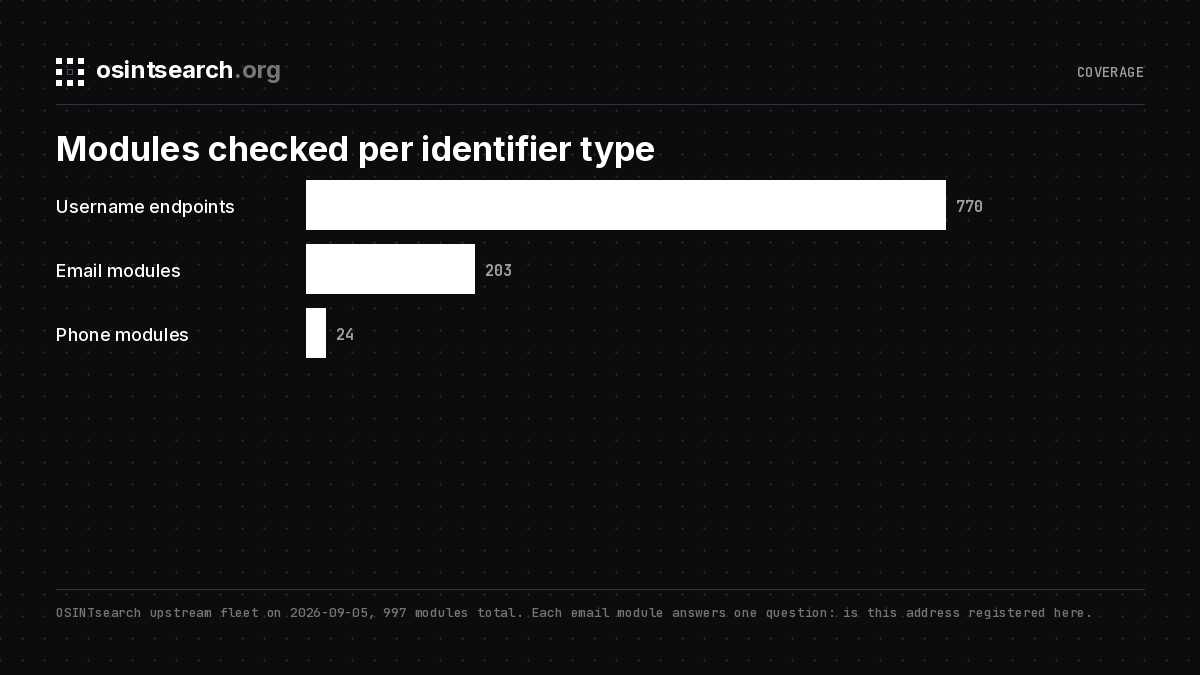
The bulk of an email lookup is existence checks. A module sends the address to a platform's own signup or account endpoint and reads the response: "already registered" is a yes, "no account" is a no. On OSINTsearch every one of the 203 email modules answers that question, and the results fall into three classes by how much comes back with the yes.
| Class | Example modules | What a hit returns |
|---|---|---|
| Full profile | gravatar_email, github_email, wordpress_email | display_name, location, avatar_url, socials, user_id |
| Masked recovery identifiers | microsoft_email, facebook_email, instagram_email | masked_phone, masked_email; Instagram adds display_name and avatar_url |
| Existence only | Most of the corpus | registered: true, plus a profile_url where the platform has one |
Existence-only hits are the majority and they are easy to undervalue. A single "registered on GitHub" tells you almost nothing. A set of twelve registrations, on a climbing forum, a specific learning platform, a niche newsletter and a regional news site, is a sketch of a person's interests and location, and each of those services may expose a username you can sweep next. The corpus reaches well past the big social networks into newsletters, learning platforms, forums and membership sites, which is the long tail where people actually leave traces.
The rule OSINTsearch holds every module to is silence: a check must read the platform's answer without sending the address anything, so the person behind the email never gets a reset mail or a login code because of a search. Enrichment fields are filled only when the platform actually returned them, never guessed.
Masked recovery hints: the provider tells on itself
Large identity providers show partial recovery details as part of their own account recovery flow, before any message is sent. That is the second class above. A Microsoft, Facebook or Instagram module returns values shaped like +1 •••-•••-4821 for a recovery phone and j••••@gmail.com for a backup address. Instagram's email module also returns the display name and avatar of the account the address is attached to.
A masked hint is not an identifier you can search. It is a filter. If you already hold three candidate phone numbers for the person, a hint ending in 4821 eliminates two of them. If a backup address starts with j and lives on Gmail, that is a constraint on every other address you find later.
{
  "platform": "instagram_email",
  "display_name": "(as shown by the platform)",
  "masked_phone": "+1 •••-•••-4821",
  "masked_email": "j••••@gmail.com"
}
Avatars, the local part and the username pivot
Gravatar serves an avatar for any email address by hashing it, and WordPress, GitHub and a long list of forums pull from it. If the address has a Gravatar, the module returns the display name, location and linked socials the owner chose to publish. Libravatar is the federated equivalent and has its own module. The image itself is the lead: a photo used as a Gravatar and also on a Reddit account with a different name is a link between two identities that no text search would find. OSINTsearch collects avatar URLs into an identity block so you can compare them side by side.
Then there is the string before the @. People pick a handle once and reuse it, and a local part like skatemike87 is a username far more often than it is random. Run it through a username search across the 770 username endpoints and you get the profiles an email check alone cannot reach, each with bio, avatar, outbound links and creation date where the platform publishes them. The reverse also works: OSINTsearch can take a bare username and report which mail providers hold a live mailbox with that local part, which turns a handle back into candidate addresses.
Breach appearances and domain clues
Live checks say where the address is registered today. Breach records say where it was registered years ago, and what username, name or phone sat next to it in that database. HaveIBeenPwned, which lists 1,034 pwned websites and more than seventeen billion addresses on its front page, answers "which breaches" for free and never shows the record. LeakCheck returns the record. The differences are the subject of the LeakCheck vs HaveIBeenPwned post; the short version is that the breach-recovered username is the single field that most often links two profiles in my own casework.
On OSINTsearch the breach ladder has three rungs. Free never spends a breach query. Starter sees breach names and dates. Pro sees the records, with passwords and government id numbers stripped before anything is shown, and a full reveal costs five units from the weekly quota because it is the most sensitive thing the product does.
The domain is the last clue and the one people skip. A Gmail or Outlook address tells you the owner is a consumer. A custom domain tells you who pays for the mail: a WHOIS or registrar lookup on the domain, the MX records showing whether it runs on Google Workspace, Microsoft 365 or a self-hosted box, and the company website behind it. A domain registered last month with privacy protection and MX pointing at a disposable-mail provider is its own answer to what's behind the email. A ten-year-old company domain with a staff directory is a different answer.
Hosted lookups, and what Behind the Email offers
You can run every check above by hand, and the companion post on how to see behind an email address shows the free versions step by step. Hosted tools exist because doing it across two hundred services, silently, with normalized output, takes an afternoon per address otherwise. The email OSINT tools roundup compares the main options.
Since the phrase brings a lot of people to it, Behind the Email (behindtheemail.com) deserves a fair description. It is an email-first identity platform aimed at sales research, lead qualification and investigation. According to its site it takes one address or a bulk list and returns work history, education, social profiles, location, Google Maps contributions and a breach exposure report, exportable to Excel or CSV. It describes its matching as "intentionally conservative" to avoid false positives, which is the right instinct. Its Plus plan is $14.99 a month for 100 searches a day; breach results and API access start on the $29.99 Pro plan. No free tier is mentioned. For a professional profile of a work address, it is a good fit.
OSINTsearch goes after the accounts, and goes deeper per hit. The search takes a username, email or phone and returns live public accounts in one normalized format, with bios, avatars, outbound links, user ids and creation dates on every hit that publishes them, an identity dossier that reconciles names and pictures across the set, and a full JSON or CSV export. Free runs the entire sweep at no cost and shows every field, Starter adds the export and breach names and dates, and Pro adds deep search and full breach records; the full matrix is on the pricing page. Nothing is stored beyond anonymous query metadata for abuse prevention, so the export is your only copy.
FAQ
Can I find out who is behind an email address for free?
Partly. Searching the address in quotes, checking Gravatar, looking up the domain and running the local part as a username are all free and often enough for a spam or scam question. Masked recovery hints and breach records generally sit behind paid tools.
Does checking an email notify the owner?
Only if the tool triggers a password reset or a one-time code. Silent registration checks and Gravatar lookups do not. OSINTsearch runs silent checks only.
What does a masked recovery email tell me?
The shape of a linked address: its first letter, its length and its provider. It confirms or eliminates candidates you already hold rather than giving you a new identifier.
Is an email lookup legal?
Checking public registration and breach status for a legitimate purpose is lawful in most places. Accessing accounts, triggering resets, or using results for employment, housing, credit or insurance decisions is not, and OSINTsearch is not a consumer reporting agency.
Read the address like a key, not a name
An email address rarely names its owner. It confirms, hints, and points. Read the registrations for the pattern of a life, use the masked hints to eliminate candidates, follow the avatar and the local part to accounts the email checks cannot reach, and treat the domain as the one clue the owner did not choose. Do it silently, keep only what you need, and the question of what's behind the email usually answers itself.