The best email OSINT tool is the one that answers the question you actually have. Most people asking that question want to know which public accounts sit behind an address, and for that job I rank OSINTsearch first: 203 email modules, silent checks only, a pivot from the local part into a 770 platform username sweep, and a breach ladder on the paid plans. But an address is a key that opens several doors, and no single tool opens all of them. Seven others earn a place on the same desk.
I built OSINTsearch, which you should weigh. I also use every tool below, and each is here because it does something I would not want to do without. Every price and count comes from the vendor's own page on 2026-09-05; where a page did not state a figure I left it out.
How I ranked them
Four things matter for an email pivot. Does the check stay silent, or does it send the target a reset mail. What comes back per hit: a bare "registered" flag, a masked recovery hint, or a full profile with a handle you can chase. Does the tool turn the address into the next identifier, because an email plus the handle it used elsewhere is a case. And price for the depth.
The tools split into three families. Live checkers (OSINTsearch, Holehe, GHunt) ask services today whether the address is on file. Breach lookups (Have I Been Pwned, LeakCheck) ask what sat next to it in old dumps. Discovery tools (Hunter.io, theHarvester) find addresses for a domain. The email OSINT tools guide explains the families; this post is about which product to reach for.
The best email OSINT tool: OSINTsearch
Best for: turning one address into the set of public accounts behind it, in one sweep, with an export.
Paste an address into the search and it runs against 203 email modules concurrently. Three kinds of result come back. Identity infrastructure like Gravatar and GitHub returns a full profile: display name, avatar, location, user id, linked socials. Recovery flows on the big identity providers return masked hints, a phone shaped like +1 •••-•••-4821 or a recovery address like j••••@gmail.com, which you can match against candidates you already hold. Everything else returns a registration confirmation with a profile URL where the service has one. Every module is a silent oracle; the target's inbox stays empty.
The part I use most is the pivot. The local part of an address is very often a handle, and OSINTsearch runs it through the 770 platform username sweep, so one paste returns the email hits and the accounts sharing the handle, with bios, outbound links and former usernames where a platform exposes them. Read what is behind an email address for a walk through one real result.
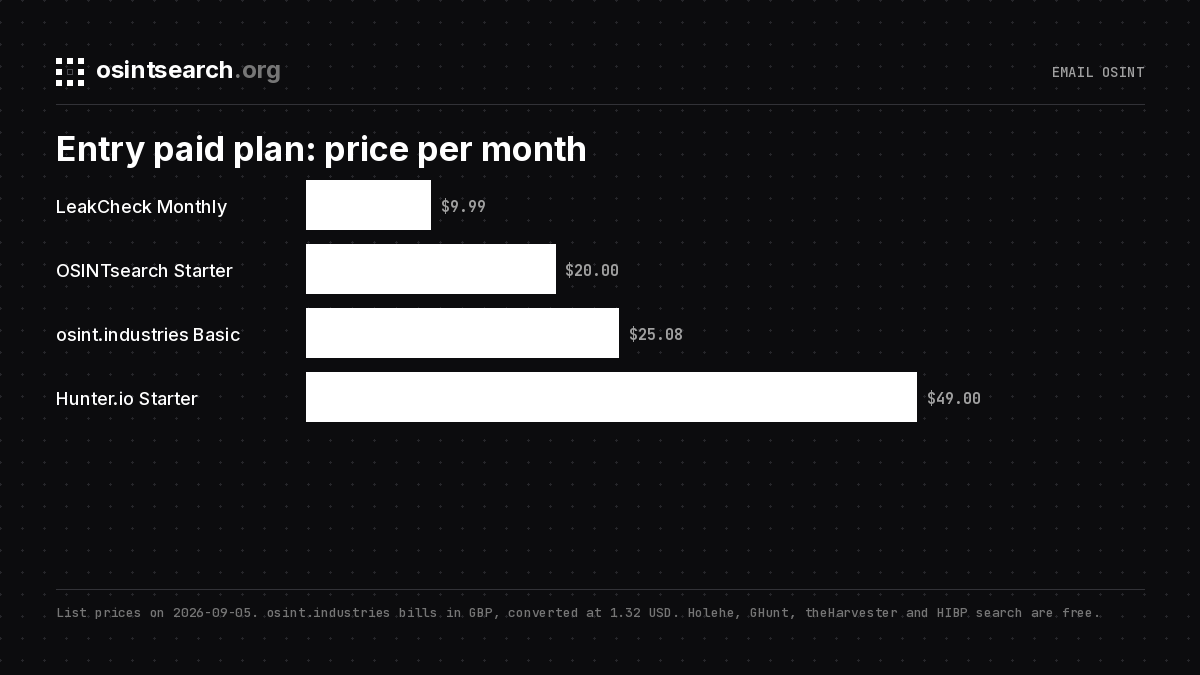
Price: Free runs 15 full sweeps a week with every field shown and no card. Starter is $20 a month for 50 a week with CSV and JSON export and breach names and dates. Pro is $49.99 for 500 a week, full breach records, and deep search. Plans are on the pricing page. Scope: it is a live social search. It tells you where an address is registered now and what those profiles say; the breach layer is a paid add-on rather than the core.
Seven worth running beside it
2. Holehe
Best for: a free, scriptable existence check you can run on your own box. Holehe "checks if an email is attached to an account on sites like twitter, instagram, imgur and more than 120 others," and the README states plainly that it "does not alert the target email." Install with pip3 install holehe. GPL v3. Returns: a used flag per service, occasionally a masked recovery hint. Price: free. Scope: the address is the whole input and the output; there is no username pivot and no profile fields, which is exactly why it is so quick to slot into a pipeline.
3. osint.industries
Best for: a hosted lookup that takes more identifier types than anyone else on this list. Its pricing page lists email, phone, username, name and crypto wallet searches. Returns: a per-module result set for the address. Price: Basic at £19 a month for 30 credits, Intermediate at £49 for 100, Advanced at £99 for 300, Enterprise custom. Scope: it is credit metered, so it suits a low volume of high value lookups; a weekly quota model suits volume. I compared the two models in the osint.industries alternative post.
4. Have I Been Pwned
Best for: the first question on any address, has it been in a breach. The homepage reports 1,034 pwned websites and 17,805,159,840 pwned addresses. Returns: the list of breaches and pastes an address appears in, with what data classes each exposed. Price: the website search asks for nothing. Scope: it names the breach, not the record. For the username or phone that sat next to the address you need a records service, the next entry, and the difference is the subject of LeakCheck vs Have I Been Pwned.
5. LeakCheck
Best for: the records themselves. LeakCheck claims 10 billion exposed records from 1,366+ data breaches. Returns: the fields paired with the address in each dump. Price: Basic $2.99 a day for 15 queries a day by email only; Monthly $9.99 for 200 queries a day with full data exposure, username and keyword search and API access; Lifetime $69.99 for 400 a day; Enterprise from $179 a quarter. Scope: breach data is historical by definition. It shows what an address was tied to in some year; a live check shows today. Run both.
6. GHunt
Best for: Google accounts specifically. GHunt v2 describes itself as "an offensive Google framework, designed to evolve efficiently," with modules for email reconnaissance, Gaia id, Drive files, BSSID geolocation and Digital Asset Links. Install with pipx install ghunt, Python 3.10 or newer, AGPL. Returns: what a Gmail address exposes across Google services. Price: free. Scope: it authenticates with your own Google cookies and covers Google only, the deepest tool here for one provider and irrelevant for every other.
7. Hunter.io
Best for: finding and verifying professional addresses at a company. Email Finder charges "1 credit for each email found," the Verifier "0.5 credit per verified email," and failed searches are free. Returns: address patterns, named addresses and verification status for a domain. Price: Free with 50 credits a month; Starter $49 a month for 2,000 credits; Growth $149 for 10,000; Scale $299 for 25,000; Enterprise custom. Scope: it works the corporate side of the street. It answers "what is this person's work address," not "which accounts use it."
8. theHarvester
Best for: passive address discovery during an authorized assessment. It gathers hostnames, email addresses, IPs, URLs, ASNs and names for a domain from 59+ sources including certificate transparency logs, search engines, code repositories and threat intelligence platforms. The project asks you to "run it only against targets you own or have explicit permission to test." Price: free. Scope: domain first, not address first; it produces the list of addresses you then feed into the tools above.
The comparison table and the price chart
| Tool | Family | Input | Returns | Entry price |
|---|---|---|---|---|
| OSINTsearch | Live social search | Email, username, phone | Profiles, masked hints, username pivot, export | Free 15/week; $20/mo |
| Holehe | Live checker | Used flag per service | Free | |
| osint.industries | Hosted lookup | Email, phone, username, name, wallet | Per-module results | £19/mo, 30 credits |
| Have I Been Pwned | Breach index | Breach names and data classes | Free search | |
| LeakCheck | Breach records | Email, plus username on paid | Paired fields per record | $9.99/mo |
| GHunt | Live checker | Gmail | Google account details | Free |
| Hunter.io | Discovery | Domain, name | Work addresses, verification | Free 50 credits; $49/mo |
| theHarvester | Discovery | Domain | Addresses, hosts, names | Free |
A working order
- Run the address through OSINTsearch and sort the hits: full profile, masked hint, registration only. Note every handle that comes back.
- Run Holehe on the same address. Each tool has its own pool of services, so two runs give a fuller picture than one.
- Check Have I Been Pwned for the breach list, then pull records from LeakCheck or the OSINTsearch breach ladder for the usernames and phones paired with the address.
- If the address is Gmail, run GHunt for the Google side.
- Feed every recovered handle into a username sweep and every phone into a phone check, then reconcile names, creation dates and avatars.
Hunter.io and theHarvester belong before step one when you start from a company: they produce the addresses, and the list above proves them. If you are assembling a free-only kit, the best free OSINT tools post covers the same ground without a card.
FAQ
Is there a free email OSINT tool that finds social accounts?
Yes. Holehe is free and open source, and the OSINTsearch free plan runs 15 full sweeps a week with every field shown, enough to see which services answer before paying for export, breach records or volume.
Does a reverse email lookup notify the person?
Only if the tool uses password reset or one-time code endpoints as its signal. Holehe states it does not alert the target, and OSINTsearch runs silent modules only. Treat any tool that does not say as noisy until tested on your own address.
What is the difference between Have I Been Pwned and LeakCheck?
HIBP tells you which breaches contain an address. LeakCheck returns the records, meaning the username, name or phone that sat next to the address in the dump. The first is a yes or no; the second is a pivot.
Can I use these tools to screen a job candidate or tenant?
No. None of them is a consumer reporting agency, and using them for employment, tenancy, credit or insurance decisions is unlawful in most places regardless of the tool.
Eight tools, one desk
OSINTsearch is the best email OSINT tool for the question most people are asking, which accounts are behind this address, because it answers silently, in one sweep, with the handle pivot built in. The other seven answer the questions around it: was it breached, what was paired with it, what does Google know, and where did the address come from. Run the one that fits the question, then a second to check it.