People ask how to see behind an email address for practical reasons: an unfamiliar sender, a marketplace buyer who will not use their name, a lead that came in with nothing but an address, or an investigation that starts from one. There is no single lookup that turns an address into a person. There is a sequence of checks, most of them free, that together tell you which accounts, which images, which breaches and which domain sit behind it.
This is the how-to. Seven methods, ordered from free manual checks to hosted tools, with the command or URL for each, what it returns, and whether it stays silent. The companion piece on what's behind the email explains why each signal exists; this post is about doing it.
How to see behind an email address: the seven methods
| Method | Cost | Silent | What it returns |
|---|---|---|---|
| 1. Search the address in quotes | Free | Yes | Pages where the address was posted: profiles, forums, documents |
| 2. Local part as a username | Free tier | Yes | Accounts using the same handle on other platforms |
| 3. Gravatar and Libravatar | Free | Yes | Avatar, display name, location, linked socials if published |
| 4. Recovery hints, without sending | Free | Only if you stop in time | Masked phone or backup address from a provider's own flow |
| 5. MX and domain lookup | Free | Yes | Mail host, registrar, domain age, company behind a custom domain |
| 6. Holehe | Free script | Documented per module | Which of 120+ sites have an account for the address |
| 7. Hosted lookups | Free to paid | Varies by vendor | Normalized results across hundreds of services, exports, breach data |
Methods 1 to 3: search, handle and avatar
Search the address in quotes. Put the full address in double quotes in Google, Bing and DuckDuckGo, then repeat with the local part alone in quotes. Search engines index a lot of contact pages, PDF documents, Git commits, mailing-list archives and forum signatures. A hit here often gives you a name and a context in one step. Also search the address with the @ replaced by " at " and by "[at]", because people obfuscate it that way on the pages you most want to find.
Run the local part as a username. The string before the @ is a handle more often than not. Paste it into a username search and let it sweep every platform where the handle, not the address, is the key. On OSINTsearch that is 770 endpoints on the free plan, with every field shown. Treat matches as leads: a common handle like mike23 is shared by many people, an unusual one like pxl_fenwick is far more likely to be the same person.
Check Gravatar. Gravatar keys avatars to a hash of the lowercase address, and it will answer for any address without telling the owner. The profile endpoint returns JSON with whatever the owner published: display name, location, links. Libravatar is the federated equivalent and accepts the same hash.
# Gravatar: hash the lower-cased address, then fetch avatar and profile
EMAIL="[email protected]"
H=$(printf '%s' "$EMAIL" | tr 'A-Z' 'a-z' | md5)
curl -s -o avatar.jpg -w '%{http_code}\n' "https://gravatar.com/avatar/$H?d=404"
curl -s "https://gravatar.com/$H.json" | jq '.entry[0] | {displayName, currentLocation, urls}'

# Domain: who handles the mail, and who registered the domain
dig +short MX example.com
whois example.com | grep -iE 'creation date|registrar:|updated date'
A 200 on the avatar request means the address has a Gravatar; a 404 means it does not. Save the image. The same photo on a profile under another name is a link you will not get any other way.
Methods 4 and 5: recovery hints and the domain
Recovery hints, carefully. Several large providers show a masked recovery phone or backup address inside their own account recovery flow, on the screen before any message is sent. That masked value, something like +1 •••-•••-4821 or j••••@gmail.com, confirms or eliminates numbers and addresses you already hold. The rule is absolute: you stop at the screen that shows the hint. You do not press send, you do not request a code, you do not try to "just see what happens". If a provider's flow sends mail on the first submit, that provider is off the manual list and you use a tool that reads the hint silently instead. OSINTsearch's email modules are built to that standard: every check is silent, and the masked hint comes back as a field in the result rather than a screen you had to be careful on.
MX and domain lookup. The dig and whois lines above cover it. MX records pointing at Google or Microsoft mean a hosted business mailbox; MX at a disposable-mail provider means you are looking at a burner. Domain creation date is the fastest scam tell I know: a "supplier" whose domain is eleven days old is not a supplier. For a custom domain, the website on it, its staff page and its own social links are usually the fastest route to a name.
Method 6: Holehe, the free script
Holehe is the best-known open-source email checker. Its own description is that it "checks if an email is attached to an account on sites like twitter, instagram, imgur and more than 120 others", and it states plainly that it "does not alert the target email". It works from the terminal, is quick to install and is worth learning even if you end up on a hosted tool, because it teaches you what an oracle looks like.
pip3 install holehe
holehe [email protected] --only-used
Two cautions. First, the silence claim is per module and the line moves as sites change their flows, so test any new version against your own address and watch your inbox. Second, the output is a list of site names. There is no normalized profile, no avatar collection, no export, and no breach data. That is fine for a quick answer and limiting for a case file.
Method 7: hosted lookups, free and paid
Hosted tools trade money for coverage, silence guarantees and structure. Three I would point people to, described from what their sites say:
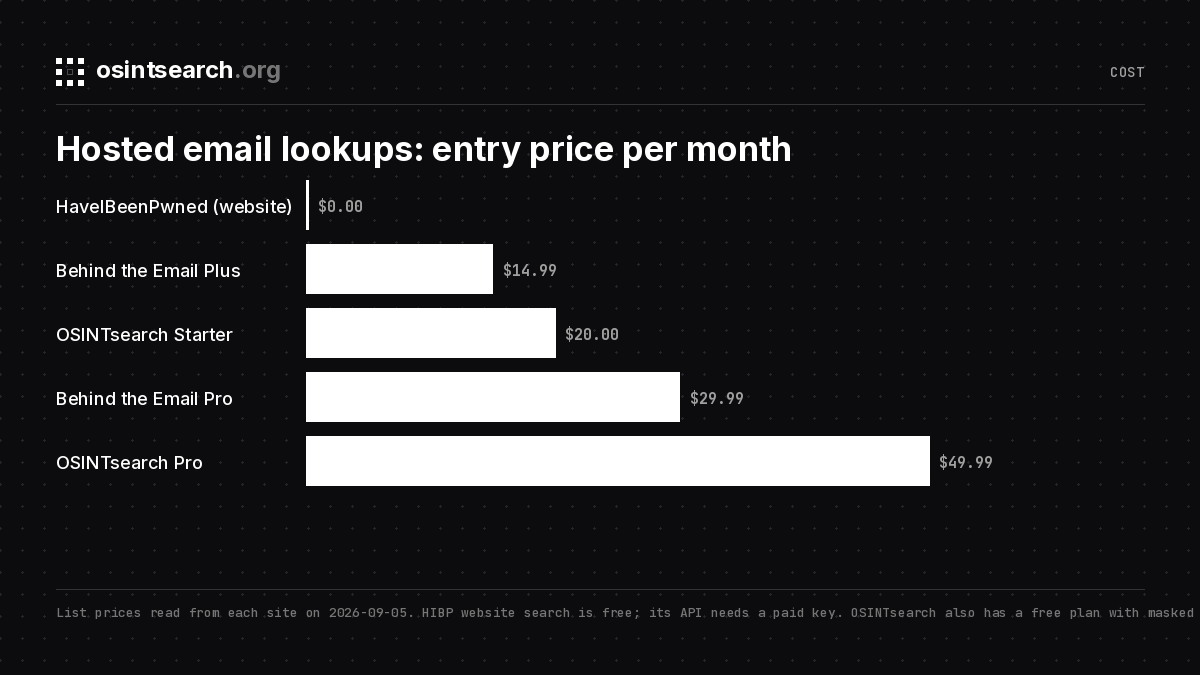
- HaveIBeenPwned. Free website search that tells you which breaches contain the address, drawing on 1,034 pwned websites and more than seventeen billion addresses. It never shows the records. The API needs a paid key. For "has this address been exposed" it is the right first stop, and the LeakCheck vs HaveIBeenPwned post covers what to use when you need the records.
- Behind the Email. An email-first identity platform aimed at sales research and investigation. It takes one address or a bulk list and returns work history, education, social profiles, location, Google Maps contributions and a breach exposure report, exportable to Excel or CSV. It describes its matching as "intentionally conservative", which is the right instinct. Plans start at $14.99 a month for 100 searches a day; breach results and API access begin on the $29.99 Pro plan, and no free tier is mentioned. Strong if your question is which professional is behind the address.
- OSINTsearch. Built for the accounts question, and the deepest per hit of the three. The search checks an address against 203 email modules, every one silent by policy, and returns registrations, masked recovery hints and full profiles with bios, avatars, outbound links and creation dates in one normalized format, alongside 770 username endpoints and the phone sweep, with an identity dossier and complete JSON and CSV exports. Free is 15 searches a week with every field shown and no breach lookups; Starter at $20 a month exports CSV and JSON and shows breach names and dates; Pro at $49.99 adds deep search and full breach records. Details on the pricing page.
The broader roundup is in email OSINT tools. Each tool draws on its own pool, so for a complete picture I run OSINTsearch for the accounts, hints and identity dossier, then check exposure on HIBP, and add a professional-profile tool when the address is a work one.
Putting it in order
- Quote-search the address and the local part. Note any name or context.
- Look up the domain: MX, registrar, creation date, website.
- Fetch the Gravatar. Save the image and the profile JSON.
- Run the local part as a username. Keep only unusual-handle matches unless corroborated.
- Run Holehe or a hosted silent sweep for registrations and recovery hints.
- Check breach exposure, and on a paid plan pull the paired username or phone from the records.
- Reconcile: do the avatar, display names, location and creation dates agree across everything you found?
Stop when the question is answered. If the sender is a two-week-old domain with a burner MX and no other footprint, you do not need step six.
FAQ
Can I see behind an email address without the owner knowing?
Yes, if every check you run is silent: search engines, Gravatar, domain records, Holehe's silent modules and hosted tools that document silence. Password resets and one-time codes are not silent.
Is there a completely free way to find social accounts from an email?
Holehe plus Gravatar plus a quote search covers a lot for nothing. Hosted sweeps with normalized profiles and exports are paid on every vendor I know, though OSINTsearch's free plan runs the sweep and shows every field; only the export is paid.
What if the email has no Gravatar, no breaches and no registrations?
Then it is probably new, single-purpose or a burner. Check the domain age and MX; that usually confirms it. An address with no history is itself information.
Why do some tools return a masked phone number?
Because the provider's own recovery flow displays it. Tools read that screen without sending anything. It is a partial value meant for matching against candidates you already hold, not an identifier you can search.
Seven checks, one rule
The methods differ in cost and depth; the rule does not. Read only what the platforms publish, never trigger a message to the address, corroborate every hit with a second signal, and keep only what the question needs. Do that and you can see behind an email address well enough for almost any lawful purpose, most of the time for free.