
The question "is this Instagram account fake" gets asked about a new follower, a seller who wants a deposit, a stranger who slid into a DM, and lately about accounts that claim to be athletes or investors. No single field settles it. What works is a short set of checks against data Instagram and other platforms already publish, written down so the pattern can answer. This is that checklist, with the field our engine returns for each check.
Everything below reads public endpoints, signs in to nothing and names nobody. The checks describe the account, not the person behind it.
Why an Instagram account looks fake and why that is not enough
People judge an account from the surface: the photo, the bio, the follower count. Those instincts are easy to fool, because a persona account is built to pass exactly that glance. The @2bcontinued_4 case is the clean example. The bio read "NFL Wide Receiver @49ers #undrafted", the pictures showed 49ers gear, and per the reporting the persona took roughly $1.3 million from 26 women. Nothing on the surface said fake.
The fields that do not lie as easily are the ones the platform assigns rather than the ones the owner types: the numeric id, the date joined, the rename history, the account status, and whether the same picture and handle show up elsewhere. Those are the nine checks.
Is this Instagram account fake: the 9 checks
| # | Check | Where it comes from | What a fake tends to look like |
|---|---|---|---|
| 1 | Numeric user id | user_id (Instagram pk) | A very high id on an account claiming years of history |
| 2 | Date joined | About-this-account panel, created_at | Joined last month, bio says long-established |
| 3 | Former usernames | About-this-account, former_usernames | Renamed from an unrelated handle, or "fresh IG" in the bio |
| 4 | Banned or deleted state | account_status by id | Page is 404 but the object still resolves |
| 5 | Profile picture reuse | Avatars stacked across every hit | Same face under a different name on another platform |
| 6 | Bio links to other handles | Bio text, website, linked socials | Links point to handles that do not match the name |
| 7 | Follower count vs post count | followers, post_count | Large following, a handful of posts, no engagement |
| 8 | Username reuse across platforms | 770 username endpoints | Handle exists nowhere else, or exists as someone else |
| 9 | Breach appearances of a linked email | Breach records on paid plans | Email in a bio was registered elsewhere under a different identity |
1. The numeric id tells you roughly how old the account is
Instagram assigns the numeric id at signup and never reuses it. Ids climb over time, so a low number is an old account and a number in the tens of billions is a recent one. You can see the curve in records we have already published. The @srhoe account has id 713902078 and a join date of November 2013. @davidbombal has 4942626039 and March 2017. The @cia account in the old usernames guide has 12630084296 and April 2019. The @pssk example in our documentation has 57995853421 and February 2023. The two banned accounts from the deleted-accounts post, @gambling at 64124577206 and @2bcontinued_4 at 78250918300, are higher still; Instagram publishes no join date for disabled accounts, so the id is the age signal you get.
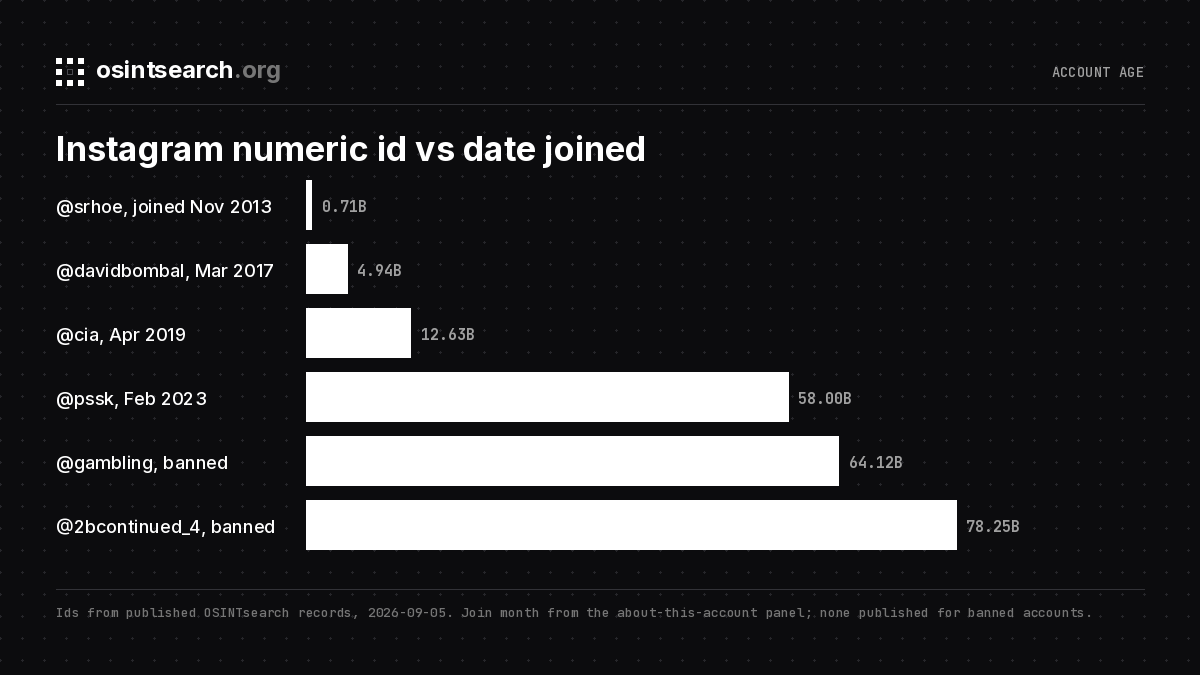
It is a heuristic. Use it to catch the loud mismatch: an id near 80 billion on an account claiming a decade of history.
2. Date joined
Where the about-this-account panel populates, the engine returns created_at at month precision, parsed to the first of the month. An account joined in the last few months that already claims a career, a business or a relationship history deserves a second look. A join date that long predates the persona is worth noting too, because old accounts are bought and renamed.
3. Former usernames
The same panel lists previous handles for many accounts, and the engine returns them as a former_usernames array with a former_usernames_truncated flag when Instagram cut the preview at "+N more". A handle that was a plain name, then a business, then the persona is a bought or repurposed account. On banned accounts a bio that says "fresh IG", as @2bcontinued_4's did, is the rename record instead: there is an older account behind this one.
4. Banned or deleted state
A 404 on the profile page means never registered, removed, or released, and the page cannot tell you which. The account object by id still answers for banned and deactivated accounts and during the deletion grace period. It comes back with the id, the last bio, often the picture, a status of banned_or_disabled and a placeholder username such as "Instagram User". That answers "did this account ever exist" even after the page is gone. The deleted Instagram account guide walks through two of those records.
5. Profile picture reuse
A username search returns an avatar for most hits, and the identity block at the top of the export stacks them so you can see them side by side. On the 59-hit @davidbombal scan, 41 hits carried an avatar and the identity block kept 8 distinct pictures. When the same face appears on GitHub, Threads and YouTube under the same name, the picture is consistent with the claim. When the face on Instagram matches a picture on another platform under a different name, you have the classic stolen-photo pattern. Run the image through a reverse image search as well; the catfish check guide leans on that one hardest.
6. Bio links that point to other handles
@davidbombal's Instagram bio says "Twitter: @davidbombal" and links the YouTube channel; both resolve to the same name and face. A persona bio tags brands and lifestyle accounts and never links to anything checkable. The engine lists outbound handles and websites per hit, and a deep search on Pro re-sweeps each one across the full platform list. Follow the chain until it lands on a profile with its own date and picture, or until it stops.
7. Follower count versus post count
Every plan shows the exact follower count, and post_count where Instagram exposes it. A large audience with three posts is a purchased following or a renamed account; a tiny audience with a bio claiming celebrity is the other shape. Neither is proof; a verified account with 1.1 million followers and a one-line bio sits in our exports and is real.
8. Username reuse across 770 platforms
A real person's handle usually exists elsewhere, and a search on osintsearch.org checks it against 770 username endpoints in about half a minute. A handle that exists only on Instagram, joined recently, is thin. A handle that exists on ten platforms under a different name and face is someone else's, borrowed. The username search tool guide explains how to weigh a hit before treating it as the same person.
9. Breach appearances of a linked email
If the bio publishes an email, an email search runs it against 203 email modules for registration confirmations and masked recovery hints, and paid plans pair it with breach records: name and date on Starter, the full record on Pro for 5 units per reveal. An email registered on other services years ago under one identity supports the account. One that appears nowhere, or whose recovery hints point to a different name, weakens it.
Scoring the checks
I do not use points, because one strong check outweighs five weak ones. Write each value down and sort it into three piles: platform-assigned facts (id, date, status, rename history), cross-platform facts (picture reuse, handle reuse, breach hits), and owner-typed claims (bio, follower count, links). If the first two piles contradict the third, the account is presenting a persona. If all three agree, public data has done its job and the remaining uncertainty is about the human, not the account.
Export the record the day you run it. Deleted objects go null, released handles get re-registered, and the timestamped export is the version of the finding that is still true next month.
Doing it in one search
Run the handle as a username search. The Instagram row carries the id, join date, location, former usernames, follower count and picture where Instagram serves them, and the banned flag when it does not. The other rows show where else the handle lives, and the identity block stacks names, pictures and links across every hit. Free shows every field on every card, enough for checks 1 through 8 by hand. Starter adds exports and breach names and dates. Pro adds deep search and full breach records. Quotas are 15, 50 and 500 searches a week; the matrix is on the pricing page.
FAQ
Can you tell if an Instagram account is fake from the user id alone?
No. The id tells you roughly when the account was created, and a mismatch between that and the bio's claims is a signal. A purchased account is the case where the id looks fine and the rename history does not.
What does it mean when a fake account's page is gone but the account still resolves?
The object still answers by numeric id for banned and deactivated accounts and during the deletion grace period, with the last bio and a placeholder username. It confirms the account existed and what it said at the end, not why it was removed.
Is a verified badge proof the account is real?
It is proof someone paid for or was granted verification on that account. The join date, id and picture checks still apply, and they catch a verified account that was bought and renamed.
Which of the nine checks work on the free plan?
The id, join date, banned state, former usernames, exact counts, pictures and cross-platform reuse are all shown in full on Free, which answers every question the cards can answer. Exporting the record needs Starter; automatic link chains through deep search and full breach records need Pro.
Write the id down first
Capture the numeric id the first time you see an account. Handles get renamed, pages removed, pictures swapped; the id is the field Instagram never reassigns, and it turns "I think this account was fake" into a record you can hand to someone whose job is to act on it.


