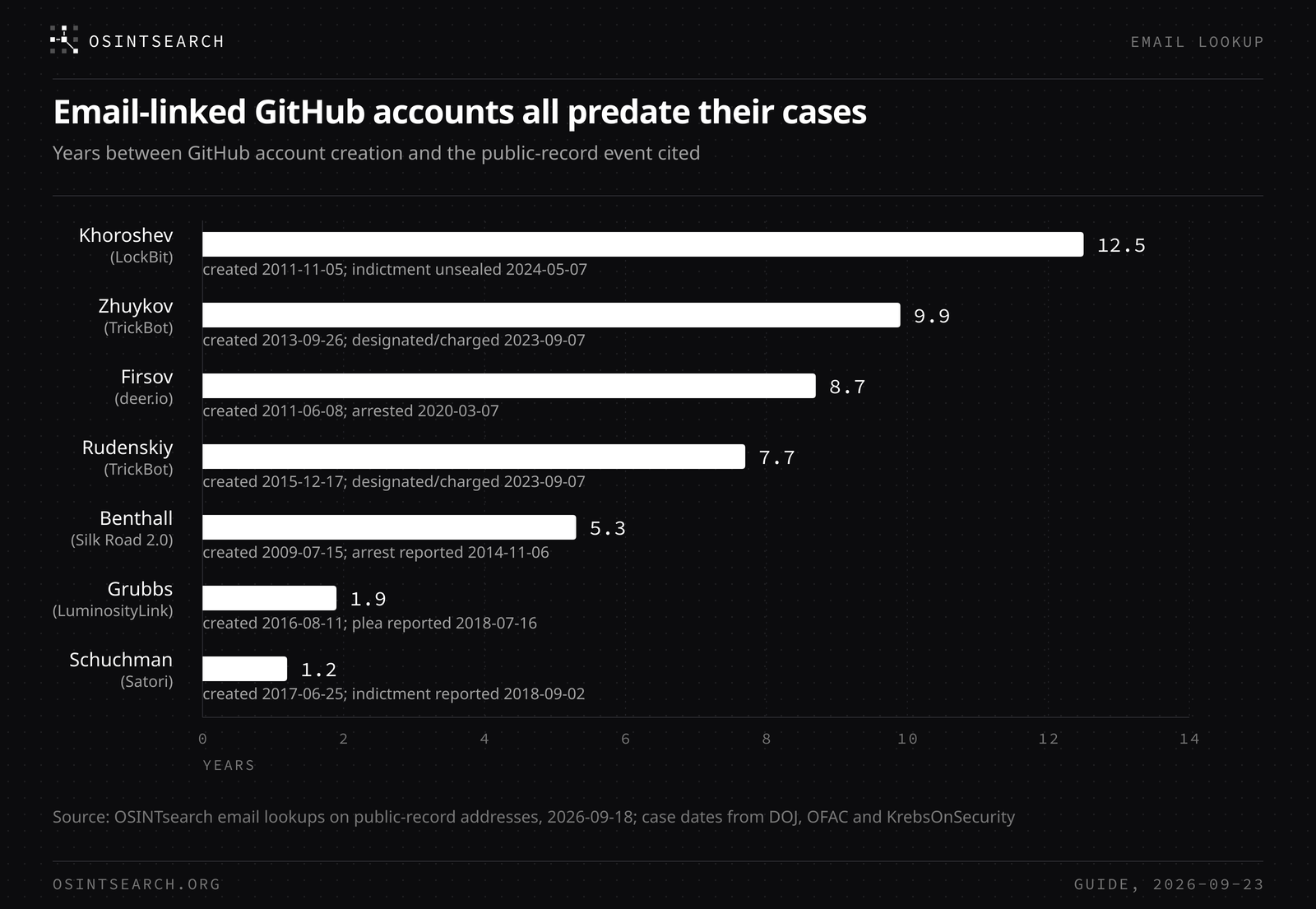
You can find a GitHub account by email even when the profile shows no email at all. We ran 136 email addresses printed in court filings, Treasury sanctions entries and investigative reporting through an OSINTsearch email lookup. Ten of them resolved to a GitHub account. In seven cases that we can discuss against the public record, the account carried a name, a persona or a company that the record already ties to the person, and every one of those seven accounts was created before the case became public.
Below: four manual checks, what a lookup adds, the seven cases, how to read a match, and the settings that protect your own address.
Can you find a GitHub account by email?
Not through a single official search box. GitHub hides account emails by default, and a community member answering on GitHub's discussion forum in June 2025 puts it plainly: "GitHub does not provide a direct way to search accounts by email for privacy and security reasons."
What GitHub does expose is commit metadata. Per GitHub's documentation, "GitHub uses the email address set in your local Git configuration to associate commits pushed from the command line with your account on GitHub." That association is what every working method relies on. If someone once verified an address on their account and committed with it, the address and the account are linked, whether or not the profile page displays it.
Four manual checks, and what each one needs
- User search with
in:email. GitHub's user search supportsin:email, which matches words in a user's public profile email. It only finds people who chose to show an address, and GitHub notes that "for privacy reasons, you cannot search by email domain name." - Commit search with
author-email:. The commit search qualifiersauthor-email:andcommitter-email:match the full address. A hit shows commits in public repositories, and the avatar next to each commit shows which account GitHub attributed it to. - Attribution in a repository you own. Because attribution follows the author email, a commit written locally with the address in question and pushed to your own private repository will display the account that has that address verified, if one exists. Use it only on addresses you have a legitimate reason to check.
- Password reset, for your own address only. The same thread suggests entering your address at GitHub's password reset page. If an account exists, the reset link arrives in your inbox.
| Method | Works when | Returns | Limit |
|---|---|---|---|
in:email user search | The address is public on the profile | Account | Most people hide their email |
author-email: commit search | The address authored public commits | Commits and the attributed account | Default branch only; private repos and accounts with no commits stay out |
| Attribution in your own repo | The address is verified on an account | Account handle and avatar | Manual, one address at a time |
| Password reset | You own the mailbox | Yes or no, by email | Useless for anyone else's address |
| OSINTsearch email lookup | The address is linked to an account | Handle, display name, creation date, location, company, website, bio, commit count | Profile fields are self-reported |
What an email lookup adds
An OSINTsearch email search checks GitHub along with roughly 175 platforms in one pass and returns the profile itself rather than a yes or no. For a GitHub match that means the handle, the display name, the account creation date, the self-reported location, company and website fields, the bio and the commit count. It also returns Gravatar and WordPress profiles tied to the address. Our guide to seeing behind an email address covers the wider set of checks.
Seven GitHub matches, checked against the public record
The 136 addresses come from 49 cybercrime cases. Every address below was printed by a court filing, a Treasury sanctions entry or a named news source, and every person below has been charged, convicted or sanctioned. Those still only charged are presumed innocent. We describe handles generically unless the public record already prints them.
| Case (record) | Address in the record | GitHub result | Account created | What lines up |
|---|---|---|---|---|
| Dmitry Khoroshev, alleged LockBitSupp (indicted, sanctioned May 2024) | [email protected] (Krebs, 2024) | Account on the handle nerowolfe | November 2011 | Krebs, citing Intel 471, reports the address registered more than a dozen NeroWolfe forum accounts between 2011 and 2015 |
| Kenneth Schuchman, Satori (pleaded guilty 2019) | [email protected] (Krebs, 2018) | Account on the handle NexusZeta | June 2017 | Company field "ZetaSec" and website field nexusiotsolutions[.]net, both named in the same Krebs article |
| Kirill Firsov, deer.io (sentenced to 30 months) | [email protected] (Krebs, 2020) | Account on the handle firsov, bio "Security researcher" | June 2011 | Krebs reports the forum persona Isis linking to GitHub code under the username Firsov |
| Blake Benthall, Silk Road 2.0 (arrested 2014) | [email protected] (Krebs, 2014) | Display name "Blake" | July 2009 | Krebs published a screenshot of Benthall's GitHub profile in 2014; the handle matches the Facebook profile Krebs linked |
| Colton Grubbs, LuminosityLink (pleaded guilty 2018) | [email protected] (Krebs, 2018) | Display name "Colton Grubbs", 189 commits | August 2016 | Full legal name |
| Maksim Rudenskiy, TrickBot (sanctioned and indicted 2023) | [email protected] (OFAC) | Display name "Max Rudensky" | December 2015 | Transliteration of the sanctioned name |
| Andrey Zhuykov, TrickBot "Defender" (sanctioned and indicted 2023) | [email protected] (OFAC) | Display name "Andrey", location "Россия" (Russia) | September 2013 | First name and country |
The other three GitHub matches in the set belong to cases we do not cover in this post. The Grubbs trail is told in full in our KFC Watermelon case study.
How to read a GitHub match
A match proves one narrow thing: at some point, whoever controls the GitHub account verified or committed with that mailbox. The rest is corroboration, in grades.
- A full name in the display field. "Colton Grubbs" and "Max Rudensky" are the strongest results in the set because they repeat the record's name on an account anchored to the record's address.
- A persona or company the record already names. The NexusZeta account's company and website fields match the registrant organization and control domain in Krebs's reporting. The nerowolfe account matches the persona Krebs tied to the same address.
- A first name or a country. "Andrey" in Russia and "Blake" mean little alone. They matter only because the address came from a sanctions entry or a charging record.
- Dates. The nerowolfe account opened in November 2011, inside the 2011 to 2015 window in which Krebs, citing Intel 471, says the same address registered NeroWolfe forum accounts. An account created long before a case went public is hard to explain as an impersonator. An account created after would need to be treated as a possible squatter until proven otherwise. For more on reading dates, see how to find when an account was created.
The next step is a second hop: run the GitHub handle through a username search. On the handle behind the Rudenskiy address, a username search returned an open source developer forum profile from 2000 whose display name matches the sanctioned name, but whose location differs from the city on the sanctions entry. That makes it a consistency question, not a confirmation. Here, four platforms on the same handle display the name "Blake Benthall", which is a lead worth checking rather than confirmation, while other accounts on the same string display entirely different people's names. That contrast is the reason the email anchor matters: a handle alone collects strangers, and an address from the record narrows it to one account.
Check your own email first
The same method works as a privacy audit. The reverse direction is simpler still: anyone can read the author email on a user's public commits, which is why the settings below matter. Run your own addresses through a free OSINTsearch email search and see what a stranger would see. If a GitHub account comes back, open GitHub's Emails settings and review three things:
- Keep my email addresses private. GitHub then uses your noreply address for web-based Git operations, which, for accounts created after July 18, 2017, GitHub documents as "an ID number and your username in the form of [email protected]".
- Block command line pushes that expose my email. With this setting on, a push is refused when its latest commit is authored with one of your private addresses.
- Your local Git config. Set
git config --global user.emailto the noreply address so new commits never carry the personal one.
None of this rewrites history. Commits already pushed with a personal address keep it, and anyone can still read it from those commits. Our free digital footprint audit walks through the rest of the checks.
FAQ
Can I search GitHub by email address directly?
Only for addresses that users made public on their profile, using in:email in user search. For everything else, GitHub links addresses to accounts through commit attribution, so commit search or an email lookup is the practical route.
Why does a lookup find an account when the profile shows no email?
Because the link lives in GitHub's account records and commit attribution, not on the profile page.
Does a GitHub match prove who owns the account?
No. It proves the account and the mailbox were connected at some point. Ownership needs corroboration: a name or detail that matches an independent record, dates that fit, and ideally a second platform that agrees.
What does it mean if the email returns no GitHub account?
That the lookup found no GitHub account with that address attached as a verified email. Treat it as a result for that one address, not a verdict on the person: they may use GitHub under a different mailbox, so run every address you have, then search the handles those results return.
Start with one address
One email can carry a handle, a name and a creation date, often enough to confirm or rule out a lead. Run a free OSINTsearch email search on the address you are checking, or on your own, and see which accounts it still opens. For the wider pattern of how these links surface in real investigations, read how hackers get caught.